Work
Real products, carried the whole distance.
This is a young studio, so the list is short — but nothing on it is a mock-up. One product is out in the world and paid for. The second is being commissioned for a working shop floor in Rochester Hills, Michigan.
Shop-floor job board — for a mold finishing shop in Rochester Hills, Michigan
The shop floor, on every screen in the building.
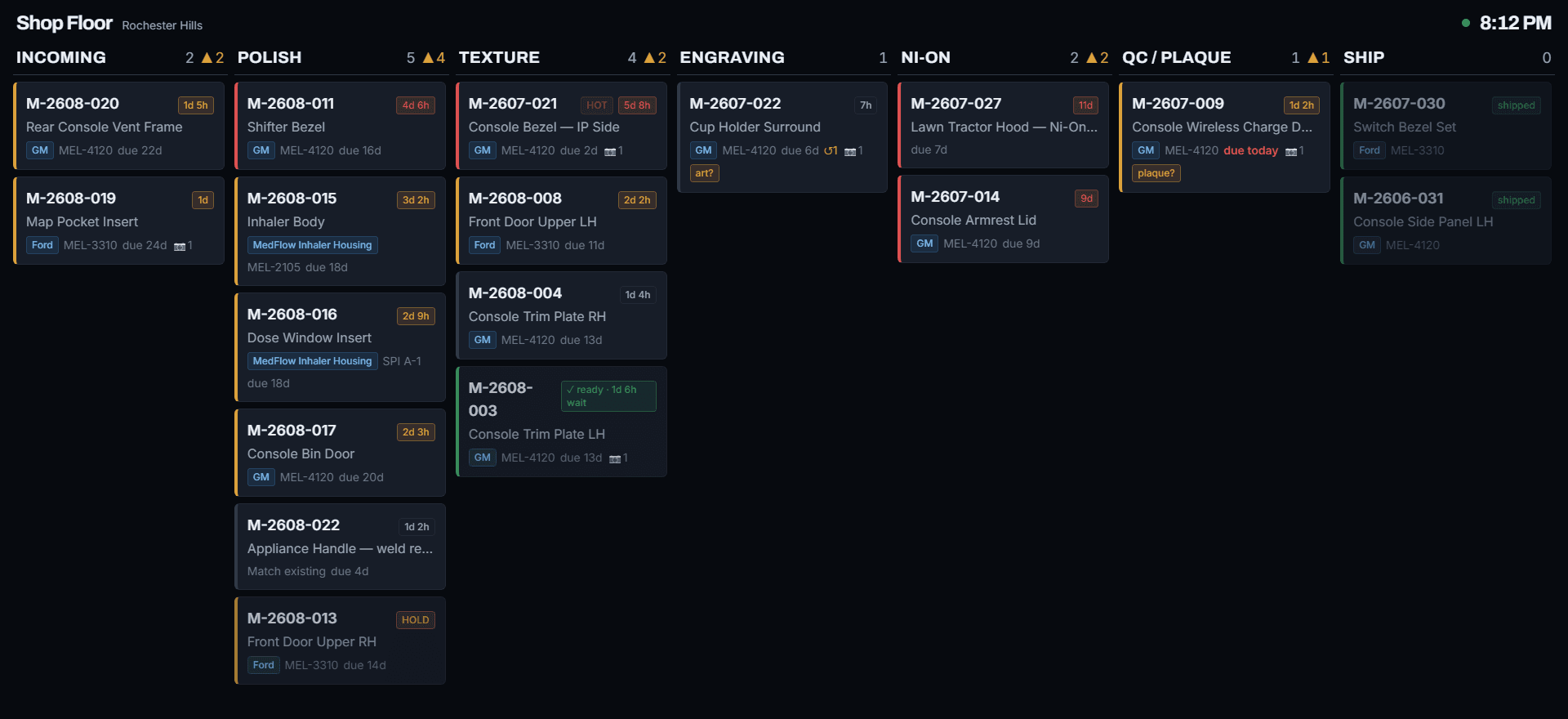
The shop finishes the steel molds that car interiors, medical devices and consumer goods are made in. A mold is a block of tool steel that can be worth more than a car, and each one passes through half a dozen hands — polish, texture, engraving, plating, inspection — before it ships. Until now, knowing where any of them stood meant walking the floor or picking up the phone.
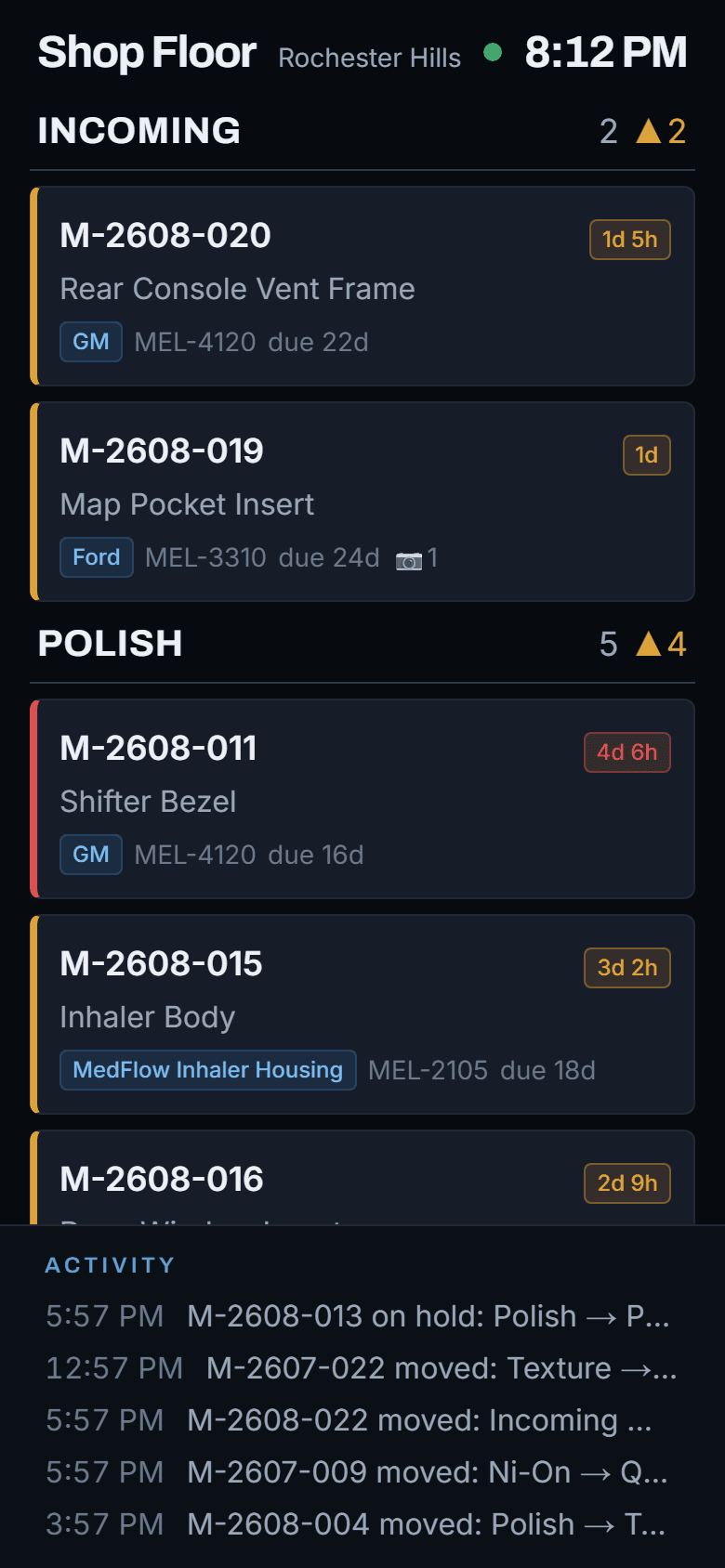
The board replaces that walk. Every mold in the building is a card in the column for the station it is at. When a technician finishes with it, they move the card from their phone, and the move shows on the wall TV, in the office and on every other phone within a few seconds. Each card shows the job, the part, the customer, the finish it needs, when it is due, how long it has sat where it is, and any photos taken along the way. A card turns amber and then red as a mold sits too long — nobody has to notice, the board does.
It was scoped, built and demonstrated as a working system rather than a slide deck, and it is being commissioned for the shop now.
What it gives the shop
- Know where every mold is without leaving your desk
- The owner and the office see the whole floor at a glance — from the office, from home, on a phone. A morning screen lists what is overdue, what is at risk given the shop's usual pace, and which molds are waiting on a customer call. The day starts with decisions instead of a walk around.
- Bottlenecks show themselves before a job goes late
- Every card carries a timer for the station it is at, with amber and red limits set per station. A mold that has sat too long is visible from across the room. The board also keeps a separate list of molds that are finished but have not moved on — turnaround time that is free to recover.
- Customers can check for themselves
- A private link per program lets a customer see the progress of their own molds without a login or a phone call. It shows only their jobs, nothing else on the floor, and it can be switched off at any time.
- Quotes built on the shop's own history
- Because every move is recorded, the board can show what each finish actually takes from door to door, and where the rework happens — the two things that decide whether a quote was right. It measures the process, never individual people, by design.
- Fewer things slip through
- Moving a mold backwards is recorded as rework and cannot be saved without a reason. A mold cannot be marked shipped until its final sign-off has been approved. Those rules live on the server, not in the screen, so there is no view of the app where they can be skipped.
- Nothing to install, nothing to type twice
- It runs in a browser. The wall TV needs no sign-in; the office signs in by email link; technicians enroll their phone once by scanning a code and then move molds with a four-digit code. Photos of a mold or a packing slip go straight from the phone camera onto the job.
Around the product
The two systems that make SailTac a business.
An application on its own is not a company. Someone has to be able to buy it, and someone has to know who bought it. These are the two halves of that, and both were built here.
The shop
sailtacperformance.com
Everything between “I want this” and “it’s running on my computer”: the sales pages, the checkout, the license that arrives by email, and the download itself. Around 7,000 lines of code across ten pages and twelve behind-the-scenes endpoints.
- One place to look, instead of two that disagree
- The usual approach is a separate customer database sitting alongside the payment provider — two records of the same person that slowly drift apart until someone is billed for something they canceled. Here the payment provider is the only record: what a customer bought and when it expires live on their billing profile. Nothing to reconcile, because there is nothing to reconcile against.
- The purchase completes even if something goes wrong halfway
- After payment, two separate things race to deliver the license — the notification from the payment provider, and the page the customer lands on. Either can be delayed or fail. Both are allowed to run, because the license each would produce is character-for-character identical, so there is no harm in it happening twice. A separate check makes sure only one email goes out.
- One command that answers “is the shop actually open?”
- A storefront can look perfect and still be quietly broken — a card processor in the wrong mode, a price that no longer exists, an email service that stopped sending. Before every release one command interrogates the live site about all of it, and confirms the download people receive matches its published fingerprint. It buys nothing, sends nothing and changes nothing.
- A test that buys the product and checks it works
- When you sell software, the worst possible failure is that the payment succeeds and the thing they paid for doesn’t open. So an automated test does the whole journey: it starts the real application, confirms it is locked, requests a license the same way a customer would, and confirms the application unlocks. Then it damages the license and confirms it is refused.
The back office
License Manager
The tool behind the counter: issue a license, renew one, see who is about to expire, and know which version every customer is running. Around 2,300 lines. It runs only on my own machine and is deliberately never given to anyone else.
- Because “I’ll remember” stops working at customer three
- Licenses were originally created by typing a command into a terminal. That works, and it remembers nothing — no record of who bought what, what they paid, or when they run out. This replaced it with a proper back office: every customer on one screen, sorted by who needs attention first, with the full history of every license they have ever been issued.
- It can check on customers without exposing their licenses
- To show which version each customer is running, the tool has to ask the website. It never sends the actual licenses to do that. It sends a one-way fingerprint of each one, and the website confirms only the ones it already knew about — so a license key, the thing that unlocks the paid product, never travels over the internet at all.
- Support sees exactly what the customer sees
- When someone gets in touch because their software is warning them about their license, the answer on my screen has to match the one on theirs. So the expiry rules here are not a second version written from the same description — they are the application’s own rules, reused directly. Support can never say “you’re fine” while the customer’s screen says otherwise.
- Built to survive an ordinary bad day
- Lose power mid-save and the customer file is not left half-written; it is swapped in complete, with a backup kept behind it. If the file is ever damaged, the tool refuses to open rather than starting up looking convincingly empty — the failure that would quietly lose a customer list. And exported spreadsheets are sanitized, because a customer’s name should not be able to run as a formula in Excel.
On the short list
Why a short list isn't nothing.
A long client list tells you a studio can win work. It tells you much less about whether the software survived contact with real users. One product carried from an empty folder to an installer, a payment processor, an update channel and a support inbox, and a second built for a working shop floor, cover more ground than a dozen engagements that ended at handoff.
Everything the three service lines describe was built for real in these two — which is why they are the three service lines.
Built along the way
The technical summary, if that's useful to you — and safe to skip if it isn't.
- Real-time marine data ingest (NMEA 0183 / 2000, serial and TCP)
- Offline-capable desktop application with its own data store
- Ed25519 offline licensing with a grace period
- Installer plus a signed 3 MB delta update channel
- Next.js commerce site with Stripe checkout and key issuance
- Chart rendering, forecast model comparison, analytics reporting
- Live job board: change-detection polling, wall-TV kiosk mode, phone-first UI
- Append-only event log with server-side gates and derived dwell timers
- Magic-link sign-in, PIN attribution on enrolled phones, hashed share links
Your project could be the next one.
Early-stage studios try harder. That is worth something, and it does not last forever.